Add structured data (JSON-LD) for product groups
Platmart Swatches stores swatch group data in public metafields on each product. You can use this data to add ProductGroup structured data (JSON-LD) to your product pages - helping search engines understand that your separate Shopify products are actually variants of the same product.
This guide walks you through building a Liquid snippet that outputs ProductGroup JSON-LD using the swatch metafields.
The Liquid snippet
Create a new file in your theme at snippets/platmart-structured-data.liquid and paste this in:
{%- comment -%}
  Platmart Swatches - ProductGroup JSON-LD structured data
  Builds schema.org/ProductGroup markup from swatch group metafields.

  Usage: {% render 'platmart-structured-data', product: product %}

  Metafield docs: https://help.platmart.io/article/208-access-app-metafields
{%- endcomment -%}

{%- assign groups = product.metafields.pl_swatches.groups.value -%}
{%- if groups == blank -%}{%- break -%}{%- endif -%}

{%- for group in groups -%}
  {%- comment -%} Skip groups that only show on collection pages {%- endcomment -%}
  {%- if group.display_for == "collections" -%}{%- continue -%}{%- endif -%}

  {%- comment -%} We need at least 2 swatches for a ProductGroup to make sense {%- endcomment -%}
  {%- if group.swatches.size < 2 -%}{%- continue -%}{%- endif -%}

  {%- comment -%} Find the current product in the swatches list {%- endcomment -%}
  {%- liquid
    assign current_swatch = nil
    for swatch in group.swatches
      if swatch.handle == product.handle
        assign current_swatch = swatch
        break
      endif
    endfor
  -%}
  {%- if current_swatch == nil -%}{%- continue -%}{%- endif -%}

  {%- comment -%}
    Try to map the option name to a schema.org property.
    color, size, material, pattern are natively supported.
    Anything else falls back to additionalProperty.
  {%- endcomment -%}
  {%- liquid
    assign option_lower = group.option_name | downcase
    assign schema_properties = "color,size,material,pattern" | split: ","
    assign variant_property = blank
    for prop in schema_properties
      if option_lower == prop
        assign variant_property = prop
        break
      endif
    endfor

  -%}

  <script type="application/ld+json">
    {
      "@context": "https://schema.org",
      "@type": "ProductGroup",
      "name": {{ product.title | json }},
      "productGroupID": {{ group.group_id | json }},
      {%- if variant_property != blank -%}
        "variesBy": [{{ variant_property | prepend: "https://schema.org/" | json }}],
      {%- endif -%}
      "hasVariant": [
        {
          "@type": "Product",
          "name": {{ product.title | json }},
          "url": {{ product.url | prepend: request.origin | json }},
          {%- if variant_property != blank -%}
            {{ variant_property | json }}: {{ current_swatch.name | json }},
          {%- else -%}
            "additionalProperty": {
              "@type": "PropertyValue",
              "propertyID": {{ group.option_name | json }},
              "value": {{ current_swatch.name | json }}
            },
          {%- endif -%}
          {%- if product.featured_image -%}
            "image": {{ product.featured_image | image_url: width: 1200 | json }},
          {%- endif -%}
          "offers": [
            {%- for variant in product.variants -%}
              {%- if forloop.first == false -%},{%- endif -%}
              {
                "@type": "Offer",
                "name": {{ variant.title | json }},
                "sku": {{ variant.sku | json }},
                "price": {{ variant.price | divided_by: 100.0 }},
                "priceCurrency": {{ cart.currency.iso_code | json }},
                "availability": {%- if variant.available -%}"https://schema.org/InStock"{%- else -%}"https://schema.org/OutOfStock"{%- endif -%},
                "url": {{ product.url | append: '?variant=' | append: variant.id | prepend: request.origin | json }}
              }
            {%- endfor -%}
          ]
        }
        {%- for swatch in group.swatches -%}
          {%- if swatch.handle == product.handle -%}{%- continue -%}{%- endif -%}
          {%- assign variant_url = product.url | replace: product.handle, swatch.handle | prepend: request.origin -%}
          ,{
            "@type": "Product",
            "url": {{ variant_url | json }}
          }
        {%- endfor -%}
      ]
    }
  </script>
{%- endfor -%}
How to set it up
1. Enable public metafields
In the Platmart Swatches app, go to Settings and turn on public metafields. This makes the swatch data accessible to your theme code. (Here's how)
2. Add the snippet to your theme
Copy the code above into snippets/platmart-structured-data.liquid .
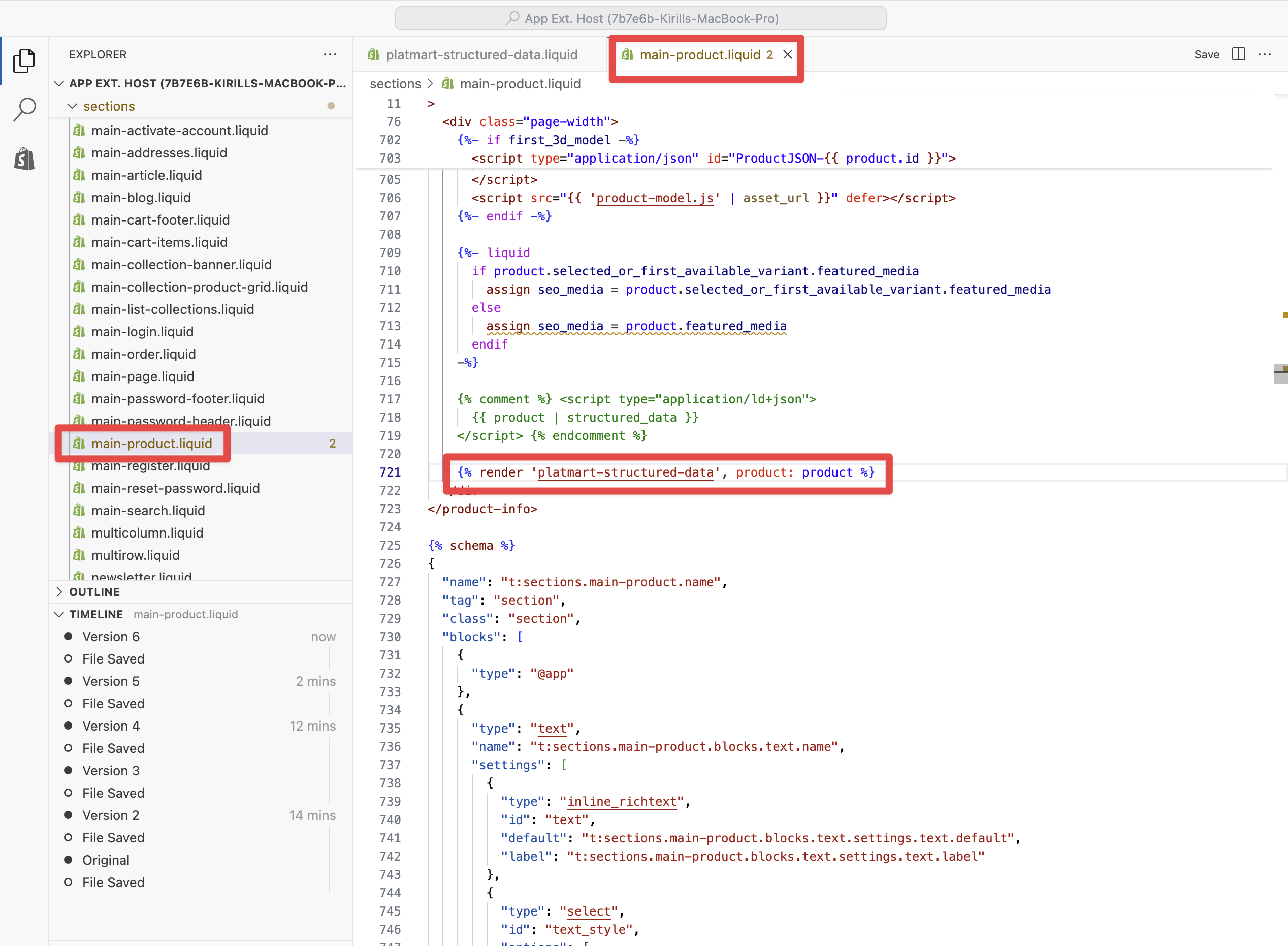
3. Render it on product pages
Drop this line into your product template (usually sections/main-product.liquid or templates/product.liquid ):
{% render 'platmart-structured-data', product: product %}
Example from Horizon theme:
4. Get rid of duplicate structured data
You only want one ProductGroup per page. Some themes output their own ProductGroup JSON-LD - look in theme.liquid , main-product.liquid , or any structured-data snippet and remove or disable it if so. For example, in Horizon themes this snippet is located in main-product.liquid and needs to be commented out:
{% comment %}
<script type="application/ld+json">
  {{ product | structured_data }}
</script>
{% endcomment %}
5. Test it
Run your product page through Google's Rich Results Test or the Schema.org Validator to make sure everything looks right.
Example output
Say you're on the page for "Backpack - Red" which comes in sizes S, M, L, and belongs to a "Color" group with Red, Blue, and White. The snippet outputs something like this:
{
  "@context": "https://schema.org",
  "@type": "ProductGroup",
  "name": "Backpack - Red",
  "productGroupID": 59,
  "variesBy": ["https://schema.org/color"],
  "hasVariant": [
    {
      "@type": "Product",
      "name": "Backpack - Red",
      "url": "https://example.myshopify.com/products/backpack-red",
      "color": "Red",
      "image": "https://cdn.shopify.com/.../backpack-red.jpg",
      "offers": [
        {
          "@type": "Offer",
          "name": "S",
          "sku": "BP-RED-S",
          "price": 49.99,
          "priceCurrency": "USD",
          "availability": "https://schema.org/InStock",
          "url": "https://example.myshopify.com/products/backpack-red?variant=1001"
        },
        {
          "@type": "Offer",
          "name": "M",
          "sku": "BP-RED-M",
          "price": 49.99,
          "priceCurrency": "USD",
          "availability": "https://schema.org/InStock",
          "url": "https://example.myshopify.com/products/backpack-red?variant=1002"
        },
        {
          "@type": "Offer",
          "name": "L",
          "sku": "BP-RED-L",
          "price": 54.99,
          "priceCurrency": "USD",
          "availability": "https://schema.org/OutOfStock",
          "url": "https://example.myshopify.com/products/backpack-red?variant=1003"
        }
      ]
    },
    {
      "@type": "Product",
      "url": "https://example.myshopify.com/products/backpack-blue"
    },
    {
      "@type": "Product",
      "url": "https://example.myshopify.com/products/backpack-white"
    }
  ]
}
The current product gets full details with an offer per Shopify variant (each with its own SKU, price, and availability). The other color variants are just URLs - Google crawls those pages and picks up their details there.
Helpful links
- Access app metafields - How to enable public metafields
- Google ProductGroup docs
- Schema.org ProductGroup
- Rich Results Test - Validate your structured data